
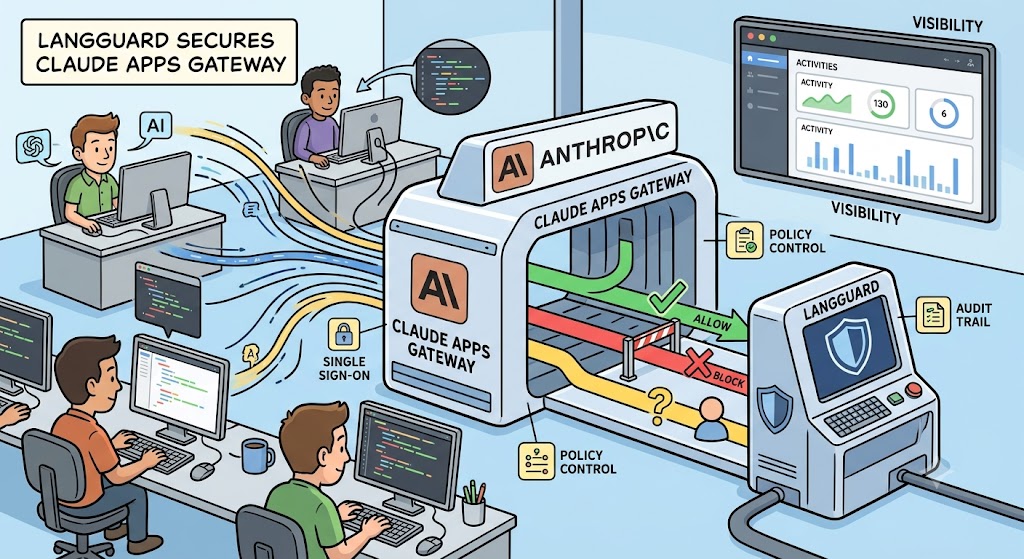
More and more engineering teams have made Claude Code, Anthropic’s command-line coding assistant, a daily part of how they ship software. Anthropic just shipped the Claude Apps Gateway, a central control point for teams running Claude Code.
Here is what it does, and how LangGuard already supports it out of the box.
What Is the Claude Apps Gateway?
An AI gateway is a central checkpoint that sits between your people and the AI models they use, so every request passes through the same door. The Claude Apps Gateway is Anthropic’s own take on this idea, built for organizations running Claude Code across a whole team. It handles single sign-on, which lets staff log in with your existing company identity system rather than juggling separate keys. It routes traffic to whichever model provider you prefer. And it pushes a shared set of rules down to every developer’s machine automatically. Instead of each person configuring their own setup, an administrator defines the policy once and the gateway hands it out to the fleet.
Why This Matters for Claude Code
You cannot govern what you cannot see. When a coding assistant can browse files, run commands, and reach out to outside services, you want a clear record of what it did and why. A lot of that reach comes from the Model Context Protocol, or MCP, a shared standard that lets an AI connect to external tools in a predictable way. A single agent might use MCP to query a database, open a ticket, or post a message in a channel. Because those actions touch real systems, one unnoticed mistake can be expensive. A gateway gathers telemetry, which simply means the automatic collection of data about what the system is doing, so leaders finally get one honest picture of activity across every team instead of a pile of separate logs.
From Watching to Acting
Seeing activity is a good first step, but the bigger win is being able to step in before a mistake lands. The Claude Apps Gateway supports hooks, which are small checkpoints that fire at key moments, such as right before the agent runs a tool. A hook can pause an action, ask a person to approve it, or block it outright. This is where a policy stops being a document that sits in a wiki and becomes something that actually runs. As we have covered before in our writing on using AI gateways for enforcement, the benefit of doing this centrally is that one rule protects everyone, rather than asking each developer to bolt their own safety checks onto their setup.
How LangGuard Plugs In
LangGuard connects to the Claude Apps Gateway through Arbiter, our enforcement engine that checks each tool request against your company policies and decides whether to allow it, block it, or ask for approval. The gateway sends its hooks to a small companion service, often called a sidecar, which is a lightweight process that runs alongside the main application and handles one specific job. That service passes each request to LangGuard and returns the verdict. On top of that, the gateway streams its telemetry to LangGuard using OpenTelemetry, an open standard for reporting how software behaves, so every action is stamped with who performed it and lands in your audit trail. Much of the appeal is the fail-closed design, meaning that if the link between the gateway and LangGuard ever drops, sensitive actions are held rather than waved through. You can read more about how Arbiter governs the action layer in our Scope and Arbiter announcement.
Setting It Up
We wanted this to be a short setup rather than a weekend project. Inside LangGuard, an administrator opens the Agent Hooks settings and follows a guided walkthrough that generates the exact configuration file the gateway needs, along with the deploy instructions for the companion service. LangGuard mints the credentials for you, including a key that lets the gateway send data in and a shared token the hooks use to prove they are trusted, then shows them once so you can store them somewhere safe. From there it is mostly copy, paste, and deploy. If your team is standardizing on the tool, our Claude Code governance page walks through what day-to-day oversight looks like in practice.
Bringing Guardrails to Fleet-Wide AI
The pattern here is a familiar one for anyone who has watched a useful tool spread through a company. First people adopt it, then they realize they need to see what it is doing, and finally they want guardrails that do not slow anyone down. The Claude Apps Gateway gives teams a clean place to put those guardrails, and LangGuard makes them easy to define, deploy, and prove. As your developers rely on AI to write and ship more code, how will you keep that speed while staying confident about what your agents are actually allowed to do?